This article was originally published in 2020 as part of the HamZone community's trial run and has been reprinted from. @lanjun
Introduction
A beginner's guide for those new to this field; please let me know if anything here is inaccurate or inappropriate.
Please note that all italicized text is a link and can be clicked directly. This involves numerous websites in English, so please use online translation tools and search engines effectively.
If you want to get straight to the point, you can start by reading "Buy, Buy, Buy!" directly.
Background information
Traditional radio is something that most ham radio operators are already familiar with, so I won't waste time explaining it again. However, software-defined radio (SDR) is a relatively newer technology, and some hams may not be familiar with it. Therefore, I will start by providing some basic knowledge.
Software-Defined Radio (SDR) is a wireless communication technology that uses software to define the radio's behavior, rather than relying on hardwired hardware. The frequency band, air interface protocol, and functionality can be upgraded through software downloads and updates without requiring complete hardware replacement.
It looks quite intimidating, but essentially, traditional radio receivers select and demodulate a specific frequency. SDRs, on the other hand, capture an entire band of frequencies and then use a programmable DSP to selectively demodulate the desired portion.
The concept of SDR was introduced in the 1990s. Current on-chip processing capabilities are already quite strong, so SDR devices currently offer reasonable performance at a relatively low price, making them an excellent choice for beginners and travelers.
Long live open source!
Open source refers to making the source code available, originating from the free and open-source software movement. This involves a brief overview of computer science history. In essence, open-source allows developers to freely participate in programming, which can accelerate development and enrich the software ecosystem.
However, a key aspect of SDR that cannot be avoided is the open-source project, GNU Radio.
GNU Radio is a free and open-source software development toolkit that provides signal processing modules to enable software-defined radio. It can be used with readily available, low-cost external RF hardware to create software-defined radios.
I've included a link to the GNU Radio project here: Official Wiki。
It's worth noting that GNU Radio is a purely software project, and the hardware aspect involves compatibility issues. The supported list includes devices such as HackRF, BladeRF, USRP, and rtl-sdr (general SDR devices).
Shopping!
To get started, you must first spend money.
Compared to traditional, wired Wi-Fi devices that cost thousands of dollars, SDR (Software Defined Radio) equipment is a niche product. On Taobao, TVs using the RTL2832+820T2/828 combination typically range from ¥40 to ¥90. Those in the ¥40 range usually have plastic shells, while those above ¥70 may have metal shells, which offer slightly better interference resistance. Anything over ¥100 is essentially a "tax" on intelligence. This gives you a frequency band reception range of up to 24MHz.1A super-mini radio with a 0.7 GHz frequency.
It's important to note that there's also a FC0012 option, which has a very narrow receiving range, limited to as low as 900 MHz. Make sure you don't buy the wrong one.
After buying the TV stick, I also had to buy an antenna. The plastic case seems to come with it, but the metal case requires an SMA connector, which needs to be purchased separately. Everyone has their own preferences when it comes to antennas, so I just bought what I liked.
By the way, this device is called a "TV stick" because it was originally designed to receive television signals. However, since it doesn't support domestic frequency bands, it has been banned.
Take out your computer/phone.
The RTL-SDR devices I purchased all have USB interfaces, so they can be directly plugged into a computer or connected to a phone using an OTG cable.
The core of software-defined radio is, naturally, the software itself.Official website of RTL-SDR Download the accompanying software. There are many, but they are largely similar; by default, you will have downloaded SDR#. (Note: system compatibility - most are for Windows, but some also support Android)
Simply having software and hardware isn't enough; we also need a bridge to connect them – drivers. You should find something like that in the SDR# you downloaded.
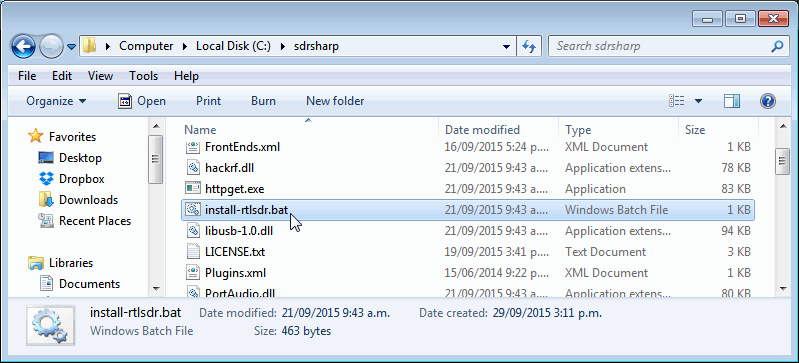
In principle, a double-click should suffice, but if it fails, you'll need to manually install the driver. See instructions below.Tutorial
Once everything is set up, you can open SDR# and see a cool spectrum display. Plug in your headphones and use the mouse to select the frequency band you want to listen to. Here's the link to the SDR# documentation:Operating Manual.
I want to use satellite communication with the sun and earth.
Some satellite frequency bands are approximately around 137 MHz, which falls within the coverage range of our SDR devices. However, acquiring these signals requires a dedicated antenna for tracking satellites, and setting this up can be quite challenging.
The best way to overcome this difficulty is to face it head-on, Ollie! While tracking satellites with a parabolic antenna is impractical, we can use a four-arm parabolic antenna.
Quadrifilar helical antennas (QFHA) offer one of the best options for high gain and high polarization ratio beams for satellite communications and satellite mobile phone systems.
This antenna is incredibly impressive because it can provide equal gain in any direction. With just a simple setup outdoors, you can receive satellite downlink signals. It's truly amazing. Specific operational details.Here。
 闽ICP备2021006864号-7
 闽公网安备35020602002794号